
Self Custody Guide

Holding Bitcoin in self custody is critical. If you don't hold the private keys, you don't own your Bitcoin.
With this guide I'm hoping to cover everything you need to start your Bitcoin self custody journey, from hot wallets, hardware wallets, air-gapped signers, seed phrase backups, 12 vs 24-word seed phrases, BIP39 passphrases, multisignature wallets and running your own Bitcoin node.
Summary
Select the section you need to scroll automatically to it.
Where to start?

There are many ways to self-custody Bitcoin, each with different costs, levels of complexity, and trade-offs. Generally, as the amount you are protecting increases, it makes sense to consider stronger security and redundancy.
As a rough starting point, the following can help illustrate how a setup might evolve as your Bitcoin holdings grow:
-
Under ~$500: A reputable hot wallet with a secure offline backup is a great start in your Bitcoin journey.
-
Over $500: It's time to upgrade to a hardware wallet, with your seed phrase securely backed up offline on steel.
-
Over $5000: A hardware wallet with a durable steel seed backup and a potential passphrase to protect yourself from someone accidentally finding your seed or physical coercion is to be considered.
-
Over ~$50,000: Consider additional protection against a single point of failure with a carefully designed multisignature wallet.
-
Over ~$100,000: A well-designed multisignature setup using signing devices from different manufacturers for those that want to stay in absolute control or a collaborative multisignature setup can also be an option for users who want additional assistance with setup, recovery, and inheritance planning.
Below is a list of hardware requirements for different setups. I separated some setups into two options, but keep in mind that option 2 isn't necessarily more secure. Option 2 will require less trust, but also more complexity.
Hot Wallet
My two favourite Bitcoin software wallets are Sparrow on desktop and Nunchuk on mobile.
They are both open-source and Bitcoin-only and allow you to create a hot wallet, generate and securely back up your seed phrase, send and receive Bitcoin, all for free.
I have been using them for years and cannot praise them enough.
Official links below.


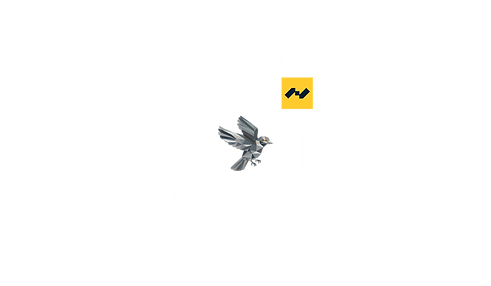

My two personal favourite! Trezor and SeedSigner.
Cold Wallet
Option 1: from AUD $154 - USD $98.
One of my long time favourite hardware wallet with a great track record is Trezor.
Their entry wallet, Trezor Safe 3, starts at an affordable price but doesn't compromise on the security. It's fully open-source and there is a Bitcoin-only option. (AUD $99 - USD $59)
A good steel backup to complete this setup is the Keystone Tablet Punch. ($AUD $55 - USD $39)
Option 2: from AUD $309 - USD $189.
Another great hardware wallet is the SeedSigner. Made for the hardcore Bitcoiner, the SeedSigner can be assembled yourself from common parts, is fully open-source, Bitcoin only, and has air-gapped functionality. (AUD $150 - USD $90)
To couple with a very high quality steel backup, the Trezor Keep Metal is an amazing product. (AUD $159 - USD $99)
Links are in the names.
Passphrase Setup
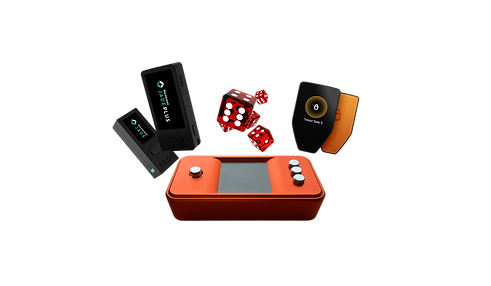
Single-signature setup with added entropy through a passphrase created offline with Casino Graded Dice.
Option 1: from AUD $299 - USD $193.
1x Trezor Safe 5 or 7 - from AUD $209 - USD $129
5x Casino Graded Dice - AUD $35 - USD $25
1x Keystone Tablet Punch - AUD $55 - USD $39
Option 2: from AUD $374 - USD $234.
1x SeedSigner - from AUD $150 - USD $90
5x Casino Graded Dice - AUD $35 - USD $25
1x Micro SD card - AUD $30 - USD $20
1x Trezor Keep Metal - AUD $159 - USD $99
Links are in the names.

Multisignature
The following list includes two option. One using a SeedSigner and dice, the second using three hardware wallets from different manufacturers (multi-vendor).
Option 1: from AUD $385 - USD $254.
1x SeedSigner - from AUD $150 - USD $90
5x Casino Graded Dice - AUD $35 - USD $25
1x Micro SD card - AUD $30 - USD $20
1x MicroSeed Based Plate Kit - AUD $170 - USD $119
Option 2: AUD $735 - USD $482.
1x SeedSigner - from AUD $150 - USD $90
1x Trezor Safe 5 or 7 - from AUD $209 - USD $129
1x Blockstream Jade - from AUD $141 - USD $99
5x Casino Graded Dice - AUD $35 - USD $25
1x Micro SD card - AUD $30 - USD $20
1x MicroSeed Based Plate Kit - AUD $170 - USD $119
Links are in the names.
Collaborative Custody
Collaborative custody with GuardBlock combines multisignature security with time-locked recovery paths, ensuring your Bitcoin remains accessible even if something goes wrong.
Their pricing as of today is 0.1% per year after a first year free of charge.
Nunchuk also offers collaborative custody with many different plans available going from $120/year to $2100/year.
Add to this to cost of hardware wallet required for your specific setup using the Multisignature section above for your total cost.

Seed phrase
A Bitcoin seed phrase is a 12 or 24-word sequence that acts as a master key to recover a wallet’s private keys and access all associated Bitcoin. It’s critical to keep it safe and stored offline in a secure location like a safe or encrypted drive. Anyone with control of your seed phrase has full control over your funds. Loss or exposure risks permanent loss of your Bitcoin, as it’s the only way to restore a wallet if a device fails or is lost.
There are many way to store your seed phrase, the cheapest and most common is simply written on a piece of paper, but it can be very risky as paper is fragile and easily lost. I highly recommend buying a seed phrase backup made out of steel to keep it safe from fire, flood, fading or any other damage.
Should you choose 12 or 24 words?
When creating your Bitcoin wallet, you will have to choose what type of seed you want to use. The most common ones are 12 or 24 words.
I can't tell you which one to use, but I can give you the relevant information for you to make that decision.
The 12 or 24 words seed phrase results from the amount of entropy used to create that seed:
128-bit entropy BIP-39 will be translated into a 12-word seed phrase.
256-bit entropy BIP-39 will be translated into a 24-word seed phrase.
Logically, a 24-word seed phrase seems like the obvious choice, more entropy, more secure, right?
Well, it depends on what potential attacks you're trying to be protected from.
The best way to understand it is through this small paragraph from Andreas Antonopoulos in Mastering Bitcoin:
"The security strength of a Bitcoin public key is 128 bits. An attacker with a classical computer (the only kind which can be used for a practical attack as of this writing) would need to perform about 2128 operations on Bitcoin’s elliptic curve in order to find a private key for another user’s public key. The implication of a security strength of 128 bits is that there’s no apparent benefit to using more than 128 bits of entropy (although you need to ensure your generated private keys are selected uniformly from within the entire 2256 range of private keys).
There is one extra benefit of greater entropy: if a fixed percentage of your recovery code (but not the whole code) is seen by an attacker, the greater the entropy, the harder it will be for them to figure out part of the code they didn’t see. For example, if an attacker sees half of a 128-bit code (64 bits), it’s plausible that they’ll be able to brute force the remaining 64 bits. If they see half of a 256-bit code (128 bits), it’s not plausible that they can brute force the other half. We don’t recommend relying on this defense—either keep your recovery codes very safe or use a method like SLIP39 that lets you distribute your recovery code across multiple locations without relying on the safety of any individual code."
The only thing I would add to that is the simplicity of a 12-word seed phrase.
12 words are much easier to memorise if needed, and you're less likely to mess up during the initial setup of your backup.
You can read Mastering Bitcoin from Andreas Antonopoulos for free on Github here:
Mastering Bitcoin, Andreas Antonopoulos - Github
You can purchase Mastering Bitcoin from Andreas Antonopoulos on his official website here:
Running a Node

Running a Bitcoin node allows you to independently verify every transaction and block against the protocol rules, so that you don't have to trust any third party. It also gives you more privacy, since you're not using a third party to relay your transaction.
Running a Bitcoin node also helps the network to stay decentralised; the more individuals running nodes, the more decentralised the network becomes.
Running a node is relatively cheap
Running a Bitcoin node, unlike mining, is designed to be cheap. It doesn't require high-performance hardware or a fast internet connection. Just about any computer could do it today with an average internet connection.
In fact, I personally used an old Mac Mini that I had bought for $150 to run a full Bitcoin node. It works perfectly and has been for years.
Where to start?
The main Bitcoin software implementations today is Bitcoin Core.
To download it, simply click on the Bitcoin Core logo below and follow the steps on the official website. If you want to use a particular version, select "Version history" ➡ "Bitcoin Core xx.x".
Once you start the application, it will verify and download the entire blockchain (unless you prune your node, in which case it will still verify the entire blockchain but not keep it on your computer entirely). This usually takes two to three days.
Note that if you don't prune your node, you will need at least 900GB of storage.
Below is the link to each application’s official website:

More recently, a new Bitcoin implementation is being built, Bitcoin Commons. Their goal is to provide a new implementation built from scratch (not keeping the code from Bitcoin Core). If you want to learn more about them, here's a link to their website:

To help you through this process if you want to do it on your own, Bitcoin.org has done a fully detailed tutorial here:
Contact us
If you need assistance with running a Bitcoin node, don't hesitate to contact us. If the issue you're running into can be resolved with just an email, we won't charge anything.
For more involved troubleshooting (e.g. screen-sharing or ongoing support), we'll discuss pricing before starting.
How to connect your node to Sparrow?

Once your node is fully synced and running, open Sparrow and head into "Settings”, then open the Server section.

Select "Bitcoin Core" and test your connection.

Once you have tested the connection and it's successful, close the tab. On the main page, at the bottom right corner, you should see a toggle switch. Make sure it's on and the colour is green when you start Sparrow. That's how you know Sparrow is connected to your node.

If you're running a pruned node and the blocks around your wallet's birthdate have been pruned, Sparrow won't be able to rescan and find your historical transactions. Either run a full node, or increase your pruning size so it retains blocks back to your wallet's birthdate.
More node setup options
There are devices that can be dedicated for tasks such as running a Bitcoin node if you don't want to do it yourself on an old computer. Those options will cost you more but be more user-friendly.
Here are a few:


How to buy it?
You can buy Bitcoin in a few different ways, the most common one being through a cryptocurrency exchange. Once you have created your account and verified your identity, you can fund your account with your local currency and buy Bitcoin through that platform. For security you should transfer your Bitcoin to a personal wallet of which you control the private key. There are multiple types of wallets (see Self-custody) but for long term holding, hardware wallets like Trezor or Cold Card are the safest way to hold your private key by keeping them offline.
You can also buy Bitcoin on P2P Platforms and Bitcoin ATMs.
Remember that if you don't own your private key, you do not own your Bitcoin!
Are you based in Australia?
If so, I would recommend using Hardblock Bitcoin Exchange. They have been helping Australians become self sovereign Bitcoin holders since 2014. I am using them for my personal and SMSF Bitcoin purchase and they have been great to deal with. They have a great approach towards your Bitcoin holdings and have an amazing support team with no bots. They are properly regulated in Australia as an AUSTRAC-registered Digital Currency Exchange, complying with AML/CTF requirements, KYC processes, and ATO data-sharing obligations.
You can sign up with them using the link below and get 12 free months of AutoSend feature (usually 400 sats)

More options available:

Earn up to $200 in BTC after creating an account, depositing at least $200 and trade at least $200.
(Every bonus is a surprise - randomly assigned with values up to $200.)

Use the code: "diveintobitcoin" and you'll get $21 to kickstart your Bitcoin investment journey with the AmberApp.

